
Mark targets & check idle workers
Right-click an ore node to mark it for workers; right-click the same node again to remove the marker. Left-clicking mines manually. These are different inputs: repeated left-clicks are not the way to toggle a work assignment.
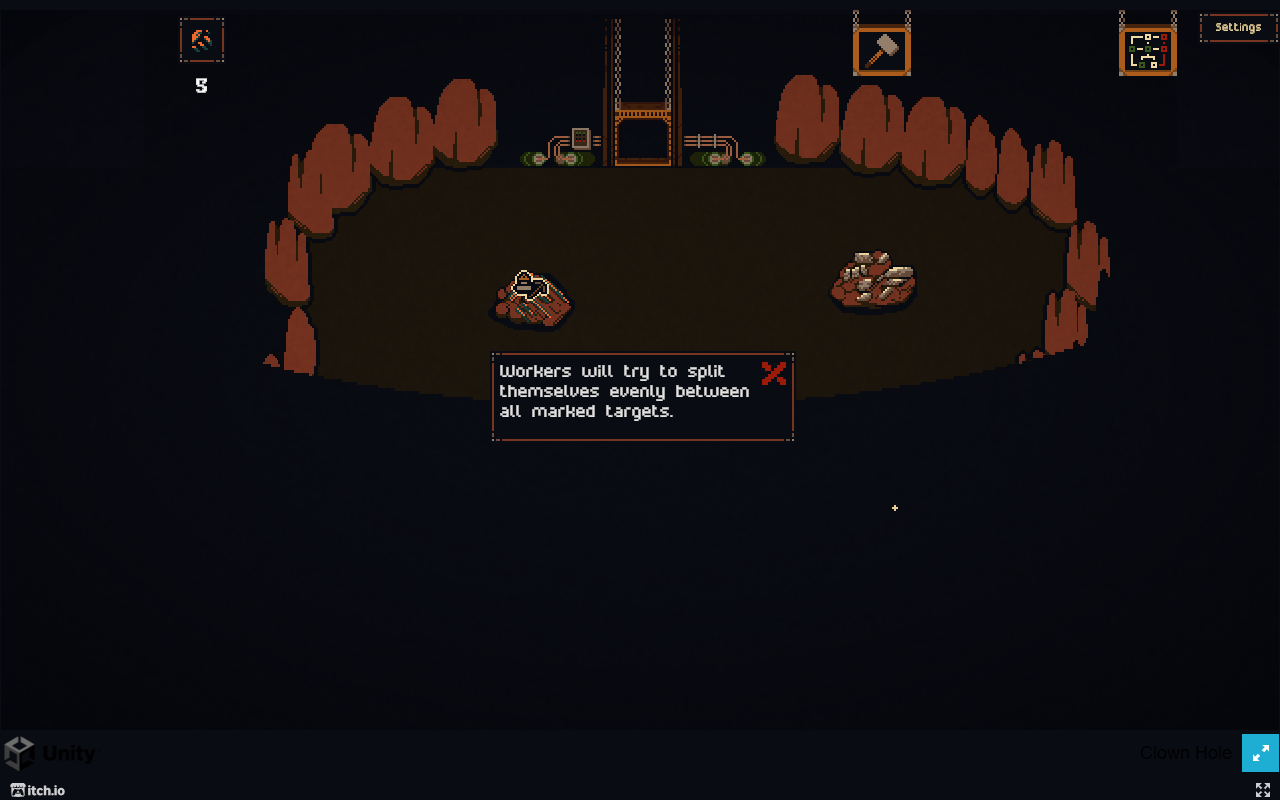
Set or remove an ore priority
- Click inside the game to give it mouse focus. Point at an ore node, rather than empty floor or the surrounding webpage.
- Right-click once. Look for the yellow work marker on the node. This is the immediate confirmation that the target is marked; it is not proof that a worker can reach it.
- To remove that priority, right-click the same node again and check that the marker disappears.
We observed this toggle on an ore node in the v0.4.3.5 tutorial. The official assignment update extends the marking system to clowns and other applicable objects and describes workers sharing marked targets. The ore check does not establish every enemy interaction or exact headcount rounding.
No marker is not the same as no possible work
The current patch notes describe improvements to finding ore when no priorities are set. Therefore, do not assume that an unmarked node can never be mined automatically. A marker is useful for expressing a priority and checking input; it is not evidence of a universal requirement to mark every ore deposit.
When a miner remains idle
- Check the input result. If no marker appears, refocus the game and try the right mouse button on the ore itself. See camera and input help if the browser is taking the input.
- Check access. Try a visible, reachable ore node. The patch specifically addresses attempts to mine ore in blocked areas; a marker does not remove a wall.
- Check whether it is one target or the whole crew. Toggle the original marker off, mark another reachable ore node, and observe. This is a diagnostic comparison, not a guaranteed pathfinding reset.
- Report a persistent failure. Include the version, object type, screenshot with the marker and whether another target worked. v0.4.3.5 fixes some priority and idle behavior, but the developer still asks players to report remaining cases.
Harvesters not moving toward eggs or silk
Describe the target as an egg or silk object when reporting a harvester problem. In a September 3 reply, developer 2bitdream said an update should address the reported failure, then specifically asked which eggs or silk were still inaccessible if it continued. An ore-mining test alone does not reproduce that harvesting problem.
- Record the displayed build and capture the target's position in the room, including nearby walls and buildings. Include the target marker if one is visible.
- Note whether every harvester is idle or whether only this object is ignored. If another accessible harvest target is available, compare that response.
- Report the exact object and location on the official game's comment page. A useful report distinguishes eggs/silk from ore and says whether assigning another target changed anything.
Do not sacrifice workers or clear your save as a routine fix. A player reported that killing and respawning the affected harvesters did not help; the developer reply does not provide a universal reset procedure.
Can a miner still get stuck after v0.4.3.5?
Yes, players have reported remaining cases. A September 8 report explicitly names Chrome and v0.4.3.5: one miner group ignored a nearby blocked passage, then responded after the player assigned a farther target and returned to the original one. This is one player's workaround, not a guaranteed fix or a measured success rate.
That report supports trying the reachable-target comparison above before changing capacity upgrades. If it makes no difference, stop repeating it and preserve the build, target and route details for a report. The official patch's request for remaining cases is more useful than assuming every idle worker is caused by a missed right-click.
Workers, fighters and capacity
Use miner hiring signs for mining help and fighter hiring signs for combat help, as described on the official game page. Before buying more capacity for idle miners, complete the target checks above. For a crew that is working but too small, compare the Miners Hiring Sign and elevator upgrades.
No fixed miner-to-fighter ratio is established here. The screenshot demonstrates assignment input only; it does not measure combat strength or establish a stationary guard formation.