
Which upgrade solves your current limit?
Choose an elevator upgrade when the lamp placement limit stops exploration. Inspect the Miners Hiring Sign when you need more hired miners. An idle crew needs a target check first: extra capacity alone does not fix a blocked or ignored ore node.
Elevator: when the lamp limit blocks you
The large-level update explicitly connects elevator upgrades to the number of lamps you can place. If you have reached that placement limit, the elevator is the relevant upgrade to inspect. Buying more miners addresses a different constraint.
Do not confuse lamp capacity with passengers per elevator trip. The v0.4.3.5 patch caps the latter at five per trip; that is not a five-lamp limit. See lighting and lamp placement for the exploration steps.
Miners Hiring Sign: when you need more miners
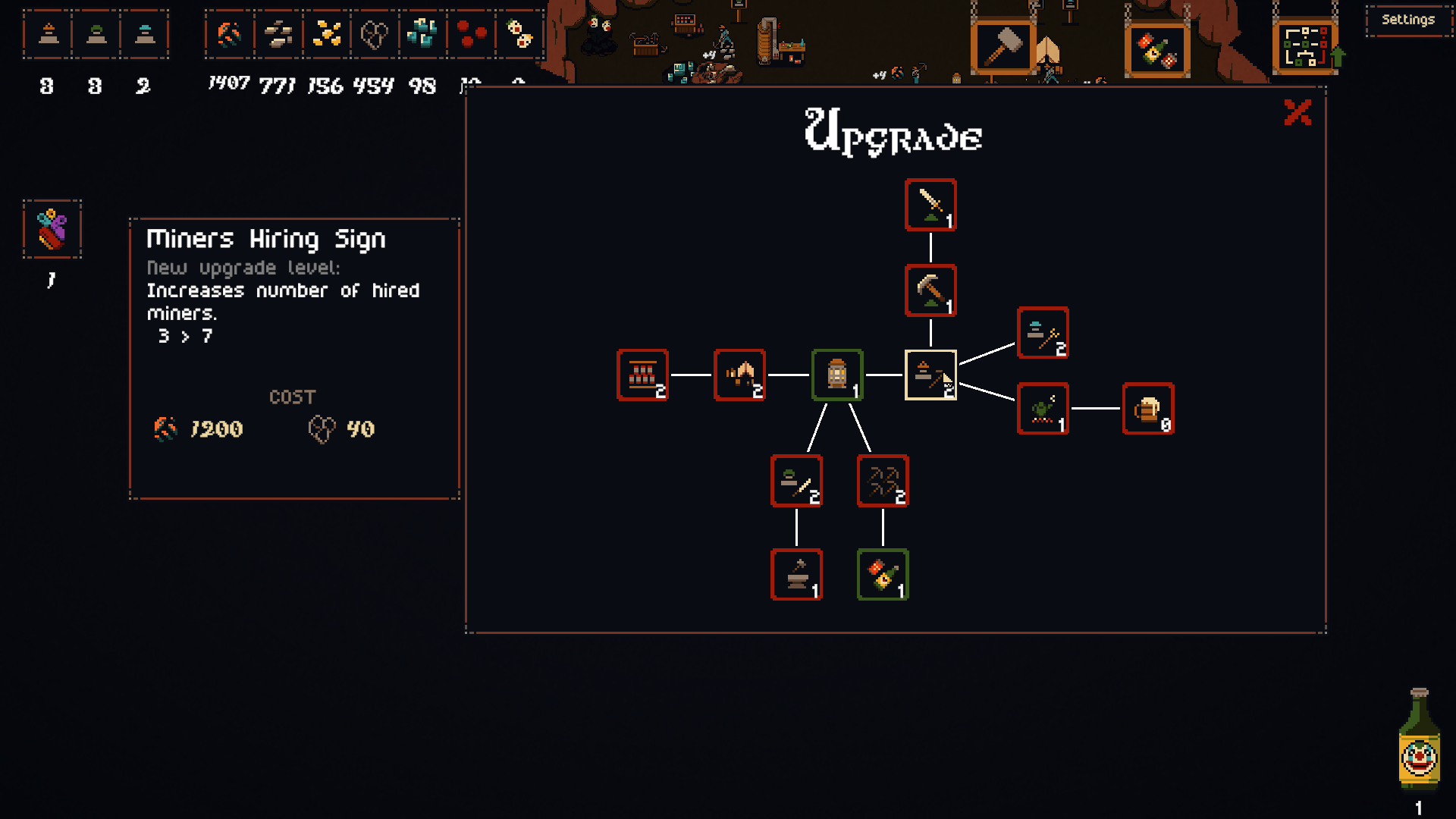
In the official screenshot above, selecting Miners Hiring Sign opens a panel that explicitly increases the number of hired miners. The next level shown changes the capacity from three to seven. That example explains what this upgrade changes; it does not establish the price or result of every level in your current run.
- Select the sign’s node in the upgrade tree.
- Read the named effect and the before/after capacity in the detail panel.
- Compare the cost icons with the resources you have. Treat the panel in your running build as the purchase information, rather than copying the historical screenshot’s price.
Already hired, but not working? Check assignments first
More capacity will not by itself resolve an idle-worker bug. v0.4.3.5 addresses workers ignoring priority ore, finding ore without priorities, and attempting ore behind blocked areas. Use the assignment and idle-worker checks before spending resources to solve the wrong problem.
Read an upgrade without mixing up its numbers
The official panel separates the upgrade level, the capacity change and the cost row. In the illustrated Miners Hiring Sign example, “3 → 7” describes miner capacity, not ore income or a damage multiplier. A larger capacity does not prove a proportional increase in income: the screenshot measures no travel time or mining output.
These are conditional choices between named systems, not an S/A/B/C ranking or a fastest-progression claim. This page does not have a complete current balance table from which to calculate payback times.
Correction to the previous guide
The update’s boss “tracks” are individual music tracks. They are not evidence of separate boss upgrade paths. The progression change actually documented in that post is that the upgrade tree became accessible while playing a level.