
Camera, clicking & sound controls
Use WASD or hold the middle mouse button and drag to move the camera. Use the scroll wheel to zoom. Left-click ore to mine; right-click an ore target to toggle its work marker. Click inside the game first if the browser has taken focus.
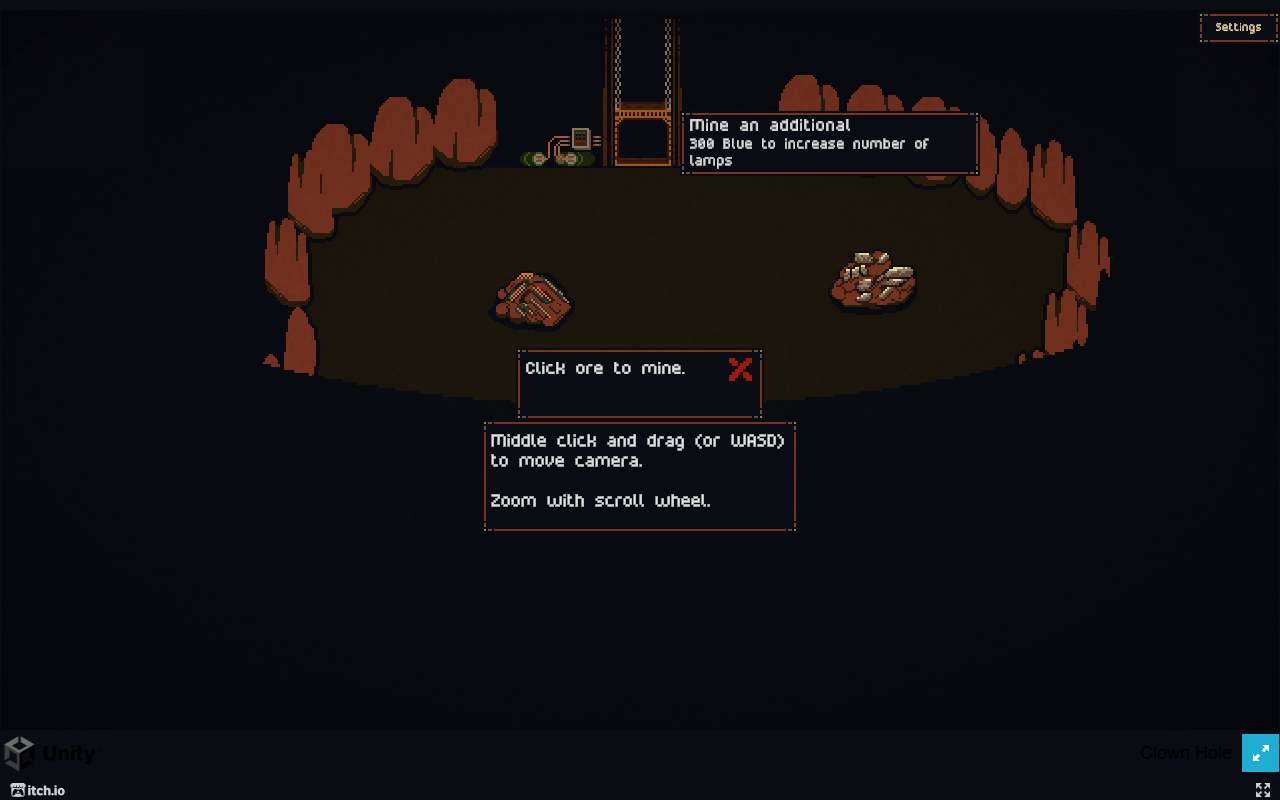
Move the view without changing a work order
The tutorial labels WASD and middle-mouse drag as camera inputs. Jaco van Hemert also confirms those alternatives in a September 2 developer reply. Drag with the wheel/middle button held, not with the left mouse button used for mining.
The tutorial labels the scroll wheel for zoom. These instructions apply to the v0.4.3.5 web prototype; they are not a complete keyboard or controller specification.
Mine, mark and unmark are different actions
- Left-click an ore node: mine it manually.
- Right-click an ore node: show its yellow work marker.
- Right-click it again: remove the marker.
These ore interactions were checked in the current tutorial. A marker appearing does not prove a worker has a clear route. See worker assignment and idle checks if input works but the crew does not move.
If the camera or mouse seems unresponsive
- Click inside the game canvas after switching tabs or clicking a page link, then try WASD again.
- If your device has no middle mouse button, use WASD instead of trying to drag with the left button.
- If the surrounding page scrolls or a browser menu appears, check that the pointer and focus are inside the game rather than the page border.
- For an embedded-player problem, use the homepage’s Popout Window or official itch.io fallback to separate an embedding issue from the game itself.
Do not assume fullscreen suppresses every browser shortcut. No controller mapping, arrow-key equivalence or touch-screen replacement for these mouse inputs is verified here. For mobile or native-app availability, see the platform status comparison.
Can you hold the button or enable auto-clicking?
The checked v0.4.3.5 tutorial and release notes do not document a built-in hold-to-mine or auto-click toggle. Use individual left-clicks for manual mining and combat. On September 2, the developer said they were considering ways to reduce repetitive clicking; that reply does not announce a finished setting.
For the automation already in the game, unlock and place hiring signs: miners help with ore and fighters help in combat. Follow the first-miner steps, then use worker priorities when a particular ore target needs attention. This can reduce manual mining, but it does not establish a fully hands-off combat strategy.
A player's separate auto-clicker is not evidence of an in-game feature. No external auto-clicking utility or hold shortcut has been validated here. Check this section again if a later official build adds that option.
Volume at minimum but sound still plays
In v0.4.3.5, moving the volume sliders all the way down is supposed to mute the game. This is an explicit patch fix, also confirmed in the developer's reply to the sound report.
- Check the version on the game's menu; the fix applies to v0.4.3.5, not an older tab left running.
- Move each game volume slider to its minimum and check again.
- If you opened the Popout Window or itch.io fallback, check whether the original player is still producing audio in another tab. Lowering one player's sliders cannot mute a second running copy.
- If the same current-build player still makes sound at minimum, record the browser, version and which sound remains, then report it on the official game's comment page. The patch note states the intended fix, not proof that every device has been tested.
Still stuck?
Record the displayed version, browser, device and exact input that failed. Use Contact & corrections for a report. Reloading may interrupt a run, and clearing browser storage can remove game data; neither is a prerequisite for testing focus or the alternative camera input.
For the first mining and building actions, follow the tutorial opening walkthrough.